Get a short summary of a long video, article or PDF
Tap Summarize on a long save and Noodle writes a few paragraphs about it on your phone. The summary is kept with the save, and you can make a new one any time.
On this page
A 40-minute video or a 4,000-word article can be summed up in a few paragraphs. Noodle writes the summary on your phone and keeps it with the save. You'll need Ask Noodle downloaded first.
Summarize a save
- Open the save. A save of about 1,000 words or more says how long it is, such as "A long item, about 3,992 words."
- Tap Summarize. Noodle shows Summarising… 1 of 6 as it works through the save in pieces.
- Wait. The summary appears under Summary, on the same screen.
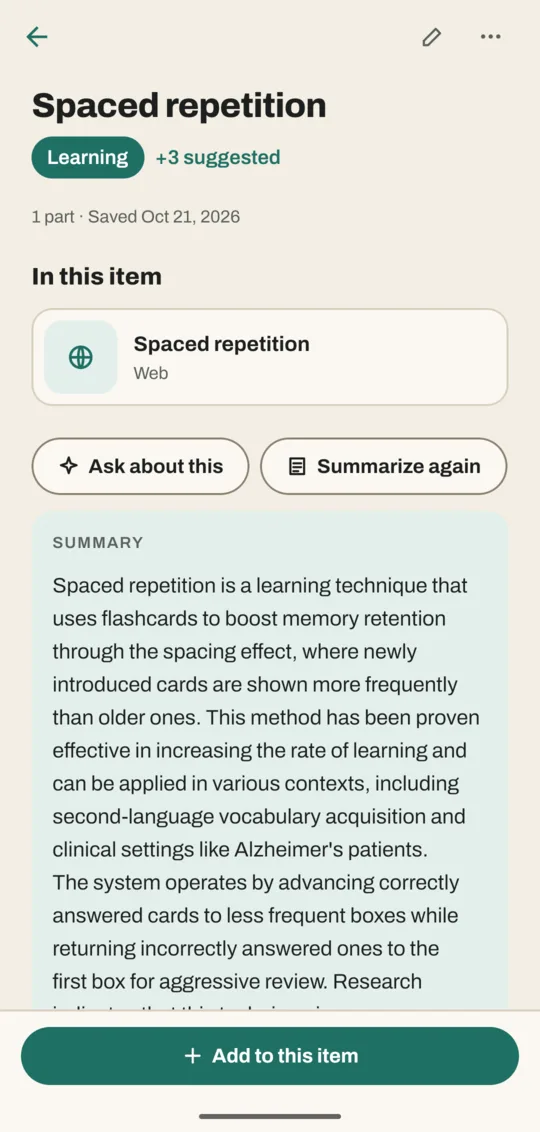
A long save can take a while, and longer on an older phone. Tap Stop if you change your mind.
Make a new summary
Tap Summarize again. The new summary replaces the old one.
Ask follow-up questions
Tap Ask about this on the same save. The chat looks only at this save, so you can ask "What are the main points?" or "What did it say about flour?"
Good to know
- Summaries are written from the words Noodle has for the save: what a video says, an article's text, a PDF's pages, a voice note's words. A video without speech or subtitles has little to summarize.
- If there isn't enough text, Noodle says There wasn't enough text to summarise.
- The summary is saved with the item and included in backups. It isn't used for search, so search results always come from the save itself.
Related
Don't have Noodle yet?
Free for Android. No sign-up, and everything stays on your phone.