Sign in and choose your AI languages
Why Noodle has an optional sign-in, what it knows about you, how to sign in with Google or an email code, change your AI languages, sign out or delete your account.
On this page
Signing in is optional. The account exists only so Noodle can download the right smart features for the languages you speak. Your saves never go to it; they stay on your phone. Without an account, Noodle still saves, organizes and searches everything, with basic English search.
What the account knows
- Your email address.
- Your AI languages.
- Basic facts about your phone (memory, Android version, processor type, app version and a random ID for this install) so Noodle downloads things your phone can run.
That's all. No notes, links, photos, titles or search words.
Sign in
- Go to Settings. The top card says Not signed in.
- Tap Sign in. A sheet titled Sign in to download opens.
- Tap Continue with Google and pick your account. If you don't see that button, or prefer email, tap Continue with email.
- For email: type your address and tap Send code. Type the 6-digit code from the email; Noodle checks it as soon as all six digits are in. Tap Send a new code if it doesn't arrive.
- Back in Settings, the top card shows your email.
Tapping Download on the AI languages card while signed out opens the same sign-in sheet.
Change your AI languages
- In Settings, find AI languages.
- Tap Change, then tap languages to add or remove them.
- Tap Save.
- Tap the download button under the languages (Download with its size, such as "Download · 210 MB"). When everything is on the phone, it says Downloaded.
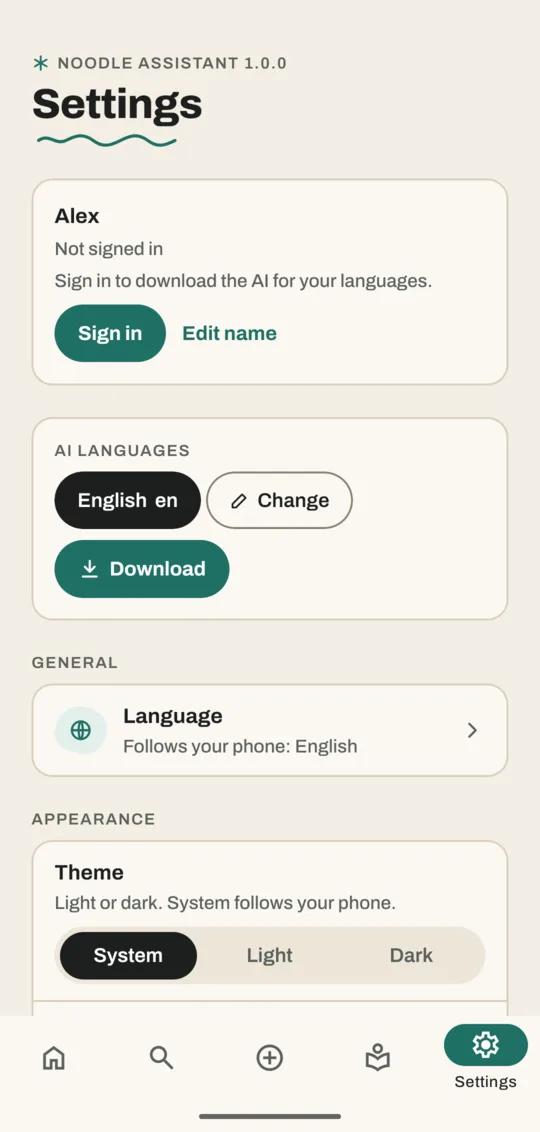
Pick the languages you speak or record in. Noodle uses them to understand voice notes and videos and to search across them. Each extra language can add a download, so leave out ones you don't use.
Change your name
Tap Edit name on the top card. Home greets you with it.
Sign out or delete your account
- Sign out: everything you saved stays on the phone, and smart features already downloaded keep working. To download anything new, sign in again.
- Delete account: removes your account, email, name, AI languages and the list of your phones from our server. Everything you saved and the downloads on your phone stay. You can make a new account any time.
Both are on the top card in Settings once you're signed in, and each asks before it does anything.
Good to know
- The app's display language is a separate setting (Language, under General).
- Translation packs (about 30 MB per language) download when a save in that language needs one, signed in or not.
Related
Don't have Noodle yet?
Free for Android. No sign-up, and everything stays on your phone.