Find your way around Noodle: the five tabs and Home
What each of the five tabs at the bottom of Noodle does (Home, Search, Save, Library and Settings) and what every card and button on Home is for.
On this page
Noodle has five tabs along the bottom of the screen. Home is where you start each day; the + in the middle is where you save things.
| Tab | What it's for |
|---|---|
| Home | Your day at a glance: today's tasks, upcoming reminders, recent saves |
| Search | Find a save by describing it, in your own words |
| Save (the +) | Save a note, link, photo, video, PDF or voice note |
| Library | Everything you've saved, with filters |
| Settings | Categories, reminders, downloads, backup and more |
What's on Home
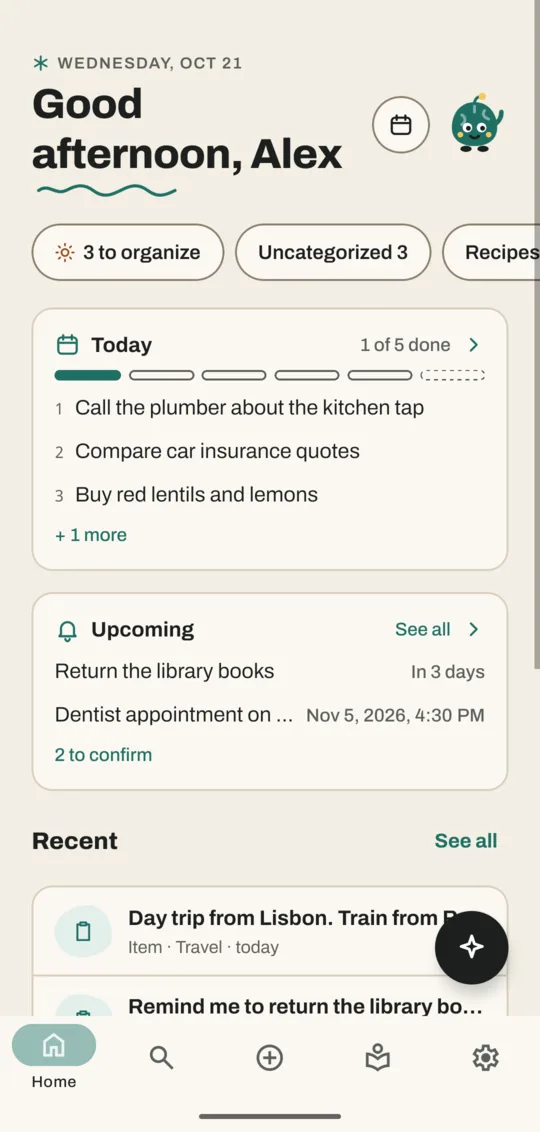
From top to bottom:
- The greeting and the date. Next to it, the calendar button opens Plan.
- Chips. The first one, such as 3 to organize, opens To organize: saves that haven't been given a category yet. The others are your categories with how many saves each has, such as Uncategorized 3. Tap one to open the Library filtered to it.
- Today. The first three open tasks from Plan and "1 of 5 done". Tap the card to open Plan.
- Upcoming. Your next reminders, shown only when you have some. See all opens Reminders.
- Unfinished. If you left something half-saved on the + page, a card offers Continue.
- Recent. Your latest saves. See all opens the Library.
- The sparkle button in the bottom corner opens Ask Noodle.
Sometimes Home also shows a Brain snack: an older save Noodle dug up for you. Tap it to open it, or touch and hold it and tap Show me another.
Move between screens
- Tap a tab at the bottom to switch to it.
- Tap a save anywhere (Home, Library, Search) to open its own screen.
- Tap the back arrow in the top corner, or use your phone's back gesture, to return.
The tab bar hides on the + page. Tap the × in its top corner to leave.
Noodle the mascot
The little green character is Noodle. It waves, listens while you record and celebrates when you file something. If you'd rather not see it, turn off Show Noodle in Settings. Noodle sounds controls its short chirps.
Next: share something into Noodle from another app.
Don't have Noodle yet?
Free for Android. No sign-up, and everything stays on your phone.