Get reminders for dates in your saves
Noodle spots dates in your notes, photos and PDFs and offers reminders: a month before, a week before and on the day. Add your own to any save, snooze them or mark them done.
On this page
Save a photo of your car insurance card and Noodle notices it renews on December 1. A clear expiry, due or renewal date gets a reminder on its own; other dates wait for you to confirm. A deadline reminder tells you a month before, a week before and on the day. You can also add a reminder to any save yourself.
Confirm a reminder Noodle found
- On Home, look at the Upcoming card. "2 to confirm" means Noodle found dates it wants you to check.
- Tap the card. Reminders opens with To confirm at the top.
- Read the suggestion and its date, such as "Suggested · Dec 1, 2026".
- Tap Remind me to keep it, or Dismiss if the date doesn't matter.
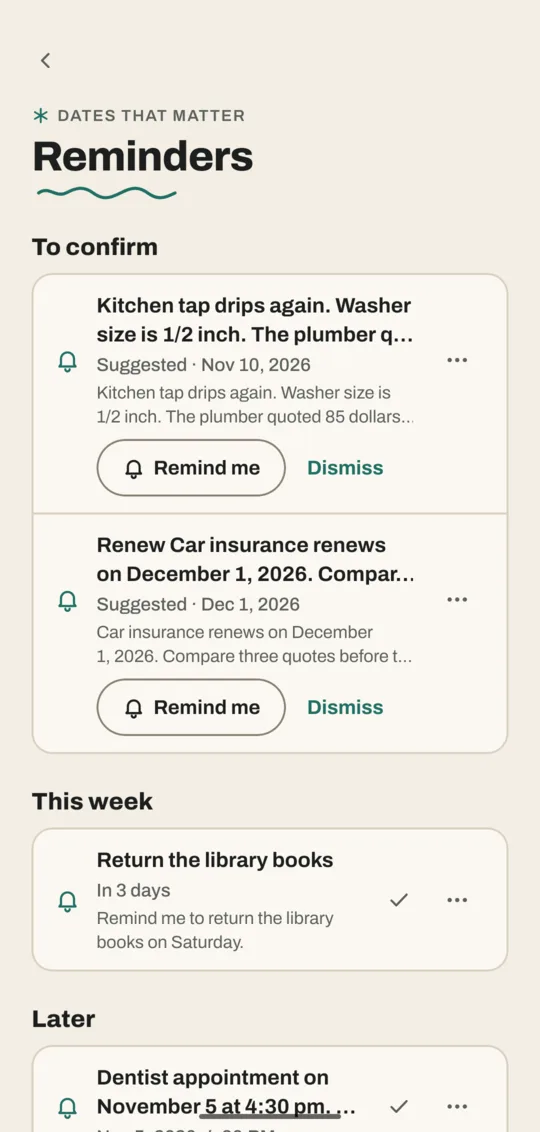
Noodle only looks for dates in your own things: notes, voice notes, photos, videos and PDFs. It doesn't look in YouTube videos, Instagram posts or web articles.
Ask for a reminder in a note
Write or say "remind me to return the library books on Saturday" in a note or voice note. Noodle sets a reminder called "Return the library books" for Saturday without asking. This works even with date finding turned off.
Add a reminder to any save
- Open the save.
- Tap ⋯ at the top, then Add reminder.
- Pick Tomorrow, Next week or In a month, or Pick a date…. Tap Add a time if you want one.
- Tap Save.
Snooze, edit or finish a reminder
On the Reminders screen, tap a reminder to open its save, or tap the check mark to mark it done. Tap ⋯ next to it for more:
| Button | What it does |
|---|---|
| Snooze | Puts it off by 1 hour, 1 day or 1 week |
| Edit | Changes the date, the time, or when you're told |
| Open item | Opens the save it belongs to |
| Delete | Removes the reminder (the save stays) |
When a reminder's notification arrives, tapping it opens the save. Its Done and Snooze buttons open Noodle to finish the job.
Change when you're reminded
Go to Settings → Reminders:
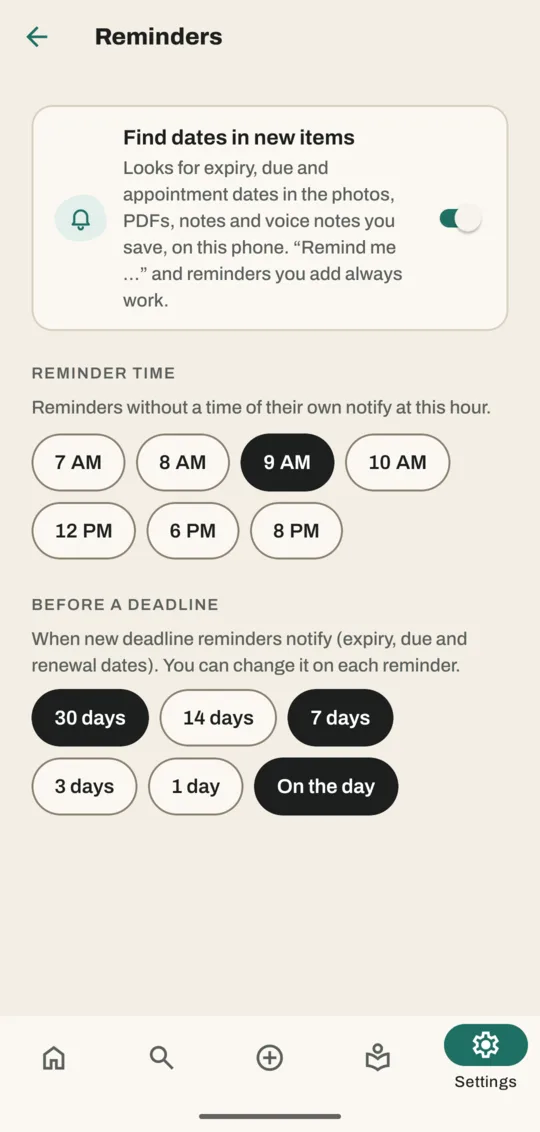
- Find dates in new items turns the date spotting on or off. "Remind me" and reminders you add still work.
- Reminder time is the hour reminders without a time arrive (9 AM unless you change it).
- Before a deadline sets how early you hear about expiry, due and renewal dates: 30 days, 7 days and on the day unless you change it.
The first time you set a reminder, Noodle asks to allow notifications. Without them, reminders can't tell you anything, and the Reminders screen shows a Turn on button.
Related
Don't have Noodle yet?
Free for Android. No sign-up, and everything stays on your phone.