Back up and restore your Noodle library
Export everything you saved to one backup file, keep it somewhere safe, and import it on a new phone or after a reinstall. Noodle keeps a copy of the old library when you restore.
On this page
Your library lives only on your phone, so a backup file is your safety net. Export one now and then, and keep it somewhere other than the phone: your cloud drive, email to yourself, or a computer.
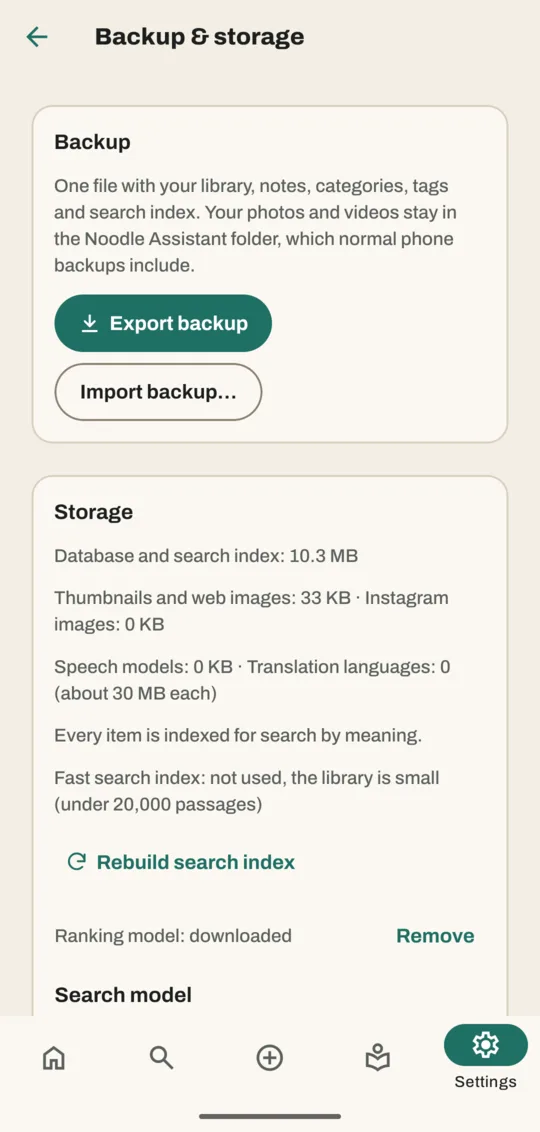
Export a backup
- Go to Settings → Backup & storage.
- Tap Export backup. Android's share sheet opens with the backup file.
- Pick where to keep it: Google Drive, Files, an email to yourself.
The file holds your saves, notes, categories, tags, Plan, reminders and chats.
Restore a backup
- Make sure the phone can reach the backup file: in Files, Downloads or your cloud drive.
- Go to Settings → Backup & storage.
- Tap Import backup… and pick the file.
- Noodle asks Replace everything? and says how many items the backup has. Tap Replace.
- The app restarts with the restored library.
Your library before the restore isn't thrown away: for a few days, Noodle keeps a copy under Safety copies in Backup & storage, with an Export button.
Move to a new phone
- On the old phone, export a backup and save it to a cloud drive or email.
- On the new phone, install Noodle and open it.
- Import the backup as above.
- Copy the Noodle Assistant folder from the old phone's Pictures to the new one, or let your phone's own backup bring it across.
- Sign in and download your smart features again; they aren't part of the backup.
What isn't in the backup
- Your photos and videos. They stay in the Noodle Assistant folder in Pictures, which your phone's normal backup (Google Photos, Files) can include.
- The PDF files and voice recordings themselves. Their words come across and you can still find them, but on a new phone you can't open the PDF or play the recording.
- Downloaded smart features. Download them again on the new phone.
- Your sign-in.
Good to know
- A backup from an older version of Noodle imports fine; Noodle updates it as it opens.
- A backup made by a newer version can't be opened until you update the app.
- If the file isn't a Noodle backup, Noodle says That file isn't a Noodle Assistant backup and changes nothing.
- Before any update to how your library is stored, Noodle also makes its own safety copy. You'll find recent ones under Safety copies in Backup & storage.
Related
Don't have Noodle yet?
Free for Android. No sign-up, and everything stays on your phone.